
Imperceptible latency
Your profile is applied inside Windows audio, on your headphones’ original output. No virtual device and no extra buffer: ≈ 1.5 ms (the time sound takes to travel half a meter).
WZ Audio calibrates your headphones to your ears, applies gamer-style presets and finds and enhances footsteps on top of any of them, with imperceptible latency: it works inside Windows audio, not on a virtual output. It also sends a copy of your audio to your stream and has its own party chat. WZ Control’s sister app.
Windows 10 (2004+) and 11 · any headphones · v2.0.61 · October 25, 2026
Many gamer audio apps route your sound through a virtual device: the game plays there first, it piles up in a buffer, gets processed and is then sent to your headphones. Every step adds milliseconds.
WZ Audio doesn’t do that. Your profile is applied with Equalizer APO in the very step where Windows mixes the audio, on your headphones’ original output. The filters process every sample instantly: no extra buffer and no virtual output. The only thing it adds is ≈ 1.5 ms (the safety limiter), the time sound takes to travel half a meter.
The copy for your stream is separate: what you hear never goes through it.
No need to know about equalizers: the app guides you step by step.
Your profile is applied inside Windows audio, on your headphones’ original output. No virtual device and no extra buffer: ≈ 1.5 ms (the time sound takes to travel half a meter).
10 bands (31 Hz to 16 kHz) for fine-tuning on top of the preset, right from Home, with test sounds.
Tells you exactly what to set in Windows and in every option of the game’s audio menu so the sound isn’t processed twice.
Calibrate your headphones against a 1 kHz reference: in 2 minutes (quick) or 10 bands (precise), plus left/right balance.
Balanced, Bass Boost, Cinema, Impact, Competitive (FPS), Clear voices, Detail and Flat —editable, and you can make your own—. They’re pure EQ, no compression. On top of any of them, WZ Dynamics raises the soft sounds that stand out from the ambience (footsteps); explosions and gunshots pass through as they are.
The game’s 3D or the app’s own 7.1 virtualizer with a head model, and a location test in 8 directions.
Sends a copy of everything you hear to a virtual cable for OBS, Streamlabs or TikTok LIVE Studio. You still hear everything directly.
Voice for up to 8 people with a name and a code, encrypted and direct between PCs. Voice activation or push-to-talk.
Turn the game, Discord, Spotify or the browser up or down, just for you.
Opens in the tray when you turn on your PC and applies your preset and your 3D audio, without permission prompts.
Change history and a button to return to the initial state, the way your audio was before WZ Audio.
Real WZ Audio screenshots. Click any of them to see it full size.
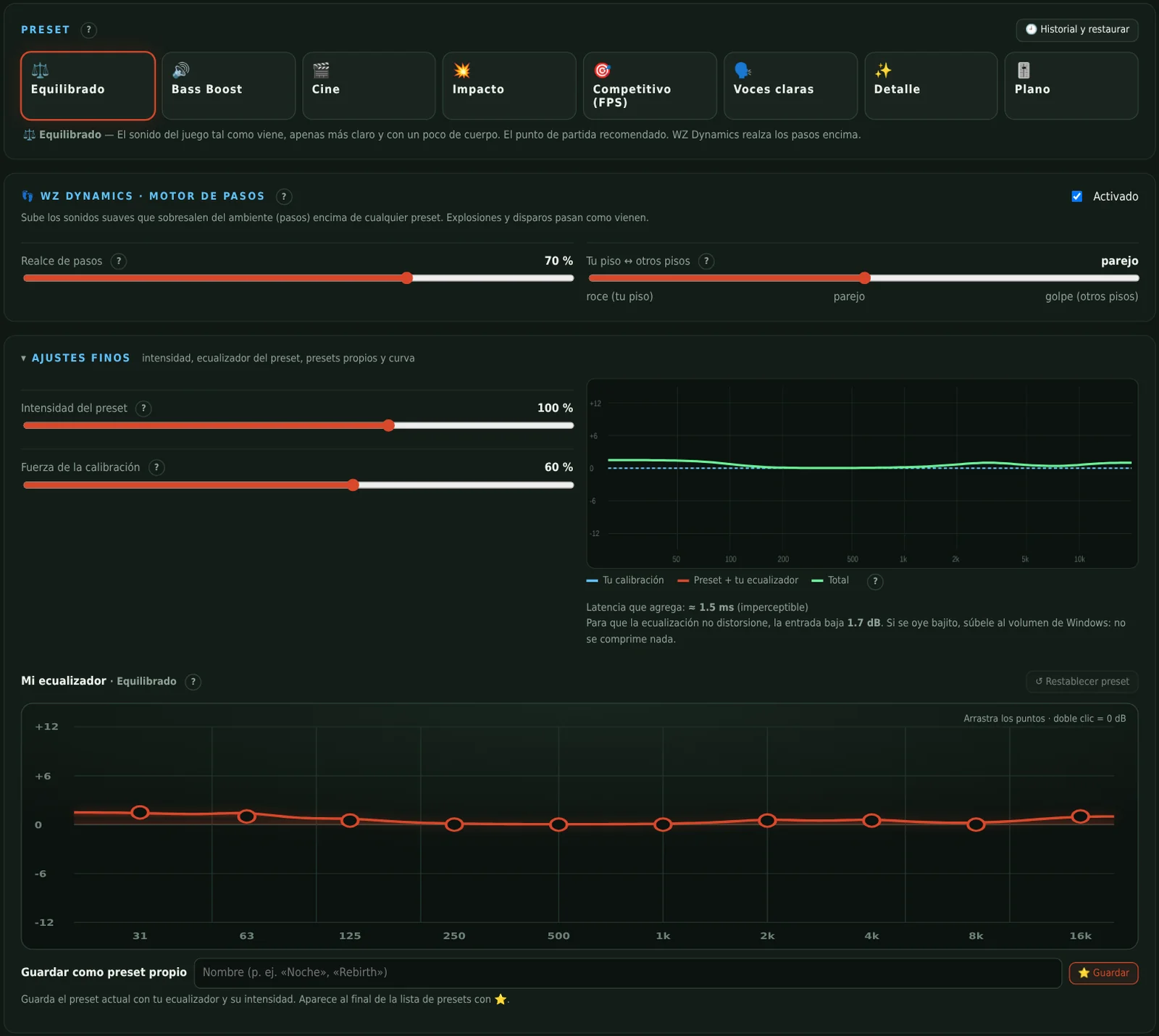
Everything for day-to-day use on one screen: switch presets, adjust the intensity, raise the extra volume if your output sounds quiet and fine-tune with your own 10-band equalizer.
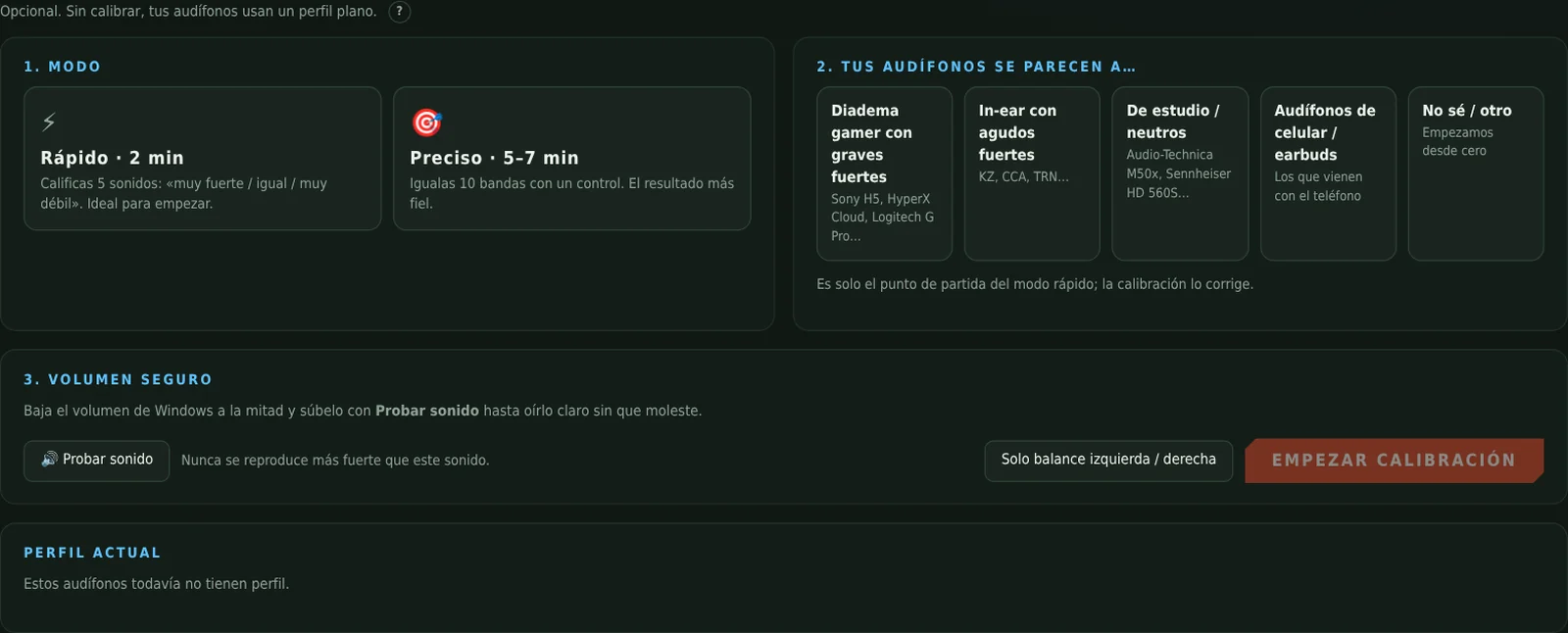
Compare each band against a 1 kHz reference until they sound equally loud. WZ Audio calculates the exact correction for your headphones and your ears.
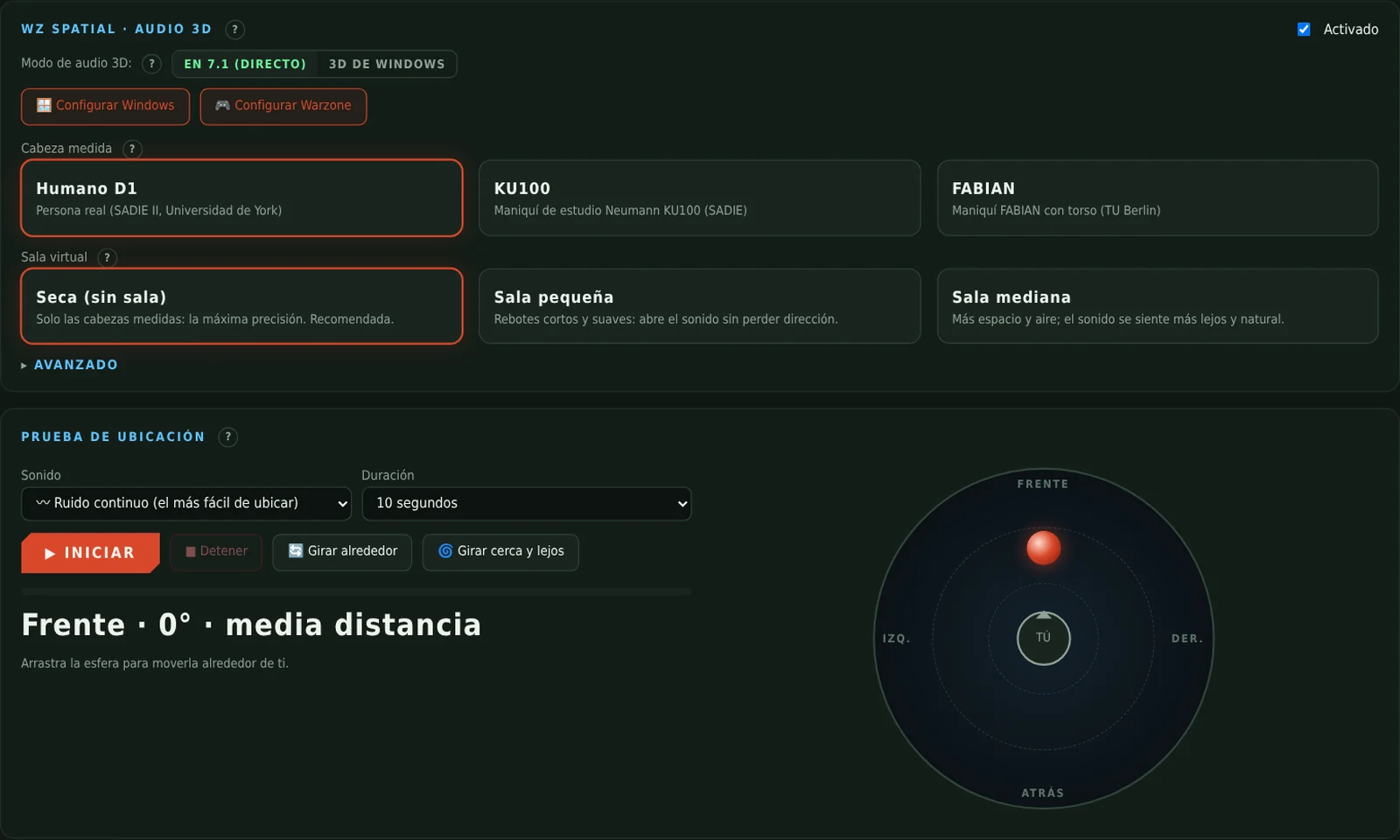
Choose the game’s 3D or WZ Audio’s 7.1 virtualizer, and the app shows you what to turn off in Windows so audio isn’t processed twice and what to set in every option of Warzone’s audio menu.

Released October 25, 2026 · 2.5 MB · Windows 10 (2004+) / 11
⬇ Free download v2.0.61 · .zip · 2.5 MB ▶ First time? Watch the installation videoFile SHA-256: 18eb133bb67e7f27d5bf4bd234c2bb4359254da43e97576c9ea036d069d20711
You only do this once. If you get stuck, the video above shows every click.
C:\. You get C:\WZAudio.For 3D audio, set your headphones to 7.1 in Windows (or use Windows 3D) and, in Warzone, Speaker Output 7.1 and Enhanced Headphone Mode Off. VB-CABLE (free) is only needed for the audio copy for your stream. Updates arrive by themselves, signed by the author: the app lets you know with a green bar.
Yes, completely: no ads, no accounts and no locked features, just like WZ Control.
Almost none: ≈ 1.5 ms, imperceptible. The filters are applied with Equalizer APO inside Windows audio, on your headphones’ output, with no virtual device and no extra buffer; only the safety limiter looks ahead 1.5 ms so nothing clips. If you come from a mixer that uses virtual outputs, you’ll notice the sound arrives sooner. The stream channels are a separate copy: what you hear doesn’t go through them.
WZ Audio doesn’t touch the game: it works on Windows audio, like a system equalizer. Even so, no third-party program can guarantee anything about the anticheat: use it at your own discretion.
It’s a free, open-source audio processor for Windows. WZ Audio uses it to apply your profile inside Windows audio, without a virtual device. When you install it, tick your headphones in the list and restart your PC.
With any headphones Windows sees as an audio output (USB, 3.5 mm, wireless with a receiver). That’s why calibration exists: every model sounds different. If they’re USB, wireless or plugged into the controller, 3D audio works with the “Windows 3D” mode (Windows Sonic, free, or Dolby Atmos): it’s explained in Help.
In the app: History and restore → Back to the initial state. It leaves Equalizer APO the way it was before. Then you can delete the folder.
No. Voice travels encrypted and directly between the PCs (WebRTC). The server only introduces the members to each other.
Only for the audio copy for your stream. For everything else, 3D audio included, you don’t need it.
WZ Audio adds ≈ 1.5 ms, the same as in 7.1. Windows Sonic adds about 5–10 ms (Dolby Atmos a bit more) and USB headphones about 5–15 ms more than the sound card; 2.4 GHz wireless, 15–40 ms. With USB headphones it usually ends up 10–25 ms above direct 7.1.
The WZ suite is and will remain free. If it helped you gain FPS, hear footsteps better, understand your fights or your lag, a donation —any amount you like— helps me put more hours into it: testing on more PCs, adding features and keeping this site online.
Donating is 100 % optional: it doesn’t unlock anything, because nothing is locked.
Secure payment processed by Stripe. This site never sees or stores your card details.